This article explains where the client records and contacts in your Refari dashboard come from, why someone you deleted in your ATS can still appear in Refari, how to remove a contact properly, and which Refari features can and cannot email those people.
What a client record holds
A client in Refari is an organisation you recruit for, listed under Clients in the dashboard sidebar. If your team recruits in-house rather than for external customers, these are the internal departments or business units you fill roles for.
Open a client and you will see three tabs:
- Contacts. The people you deal with at that organisation, usually the hiring manager on a role. Each contact holds a name, email address and phone number.
- Workplace Addresses. The locations a role can be based at.
- Communications. A timeline view of your correspondence with that client.
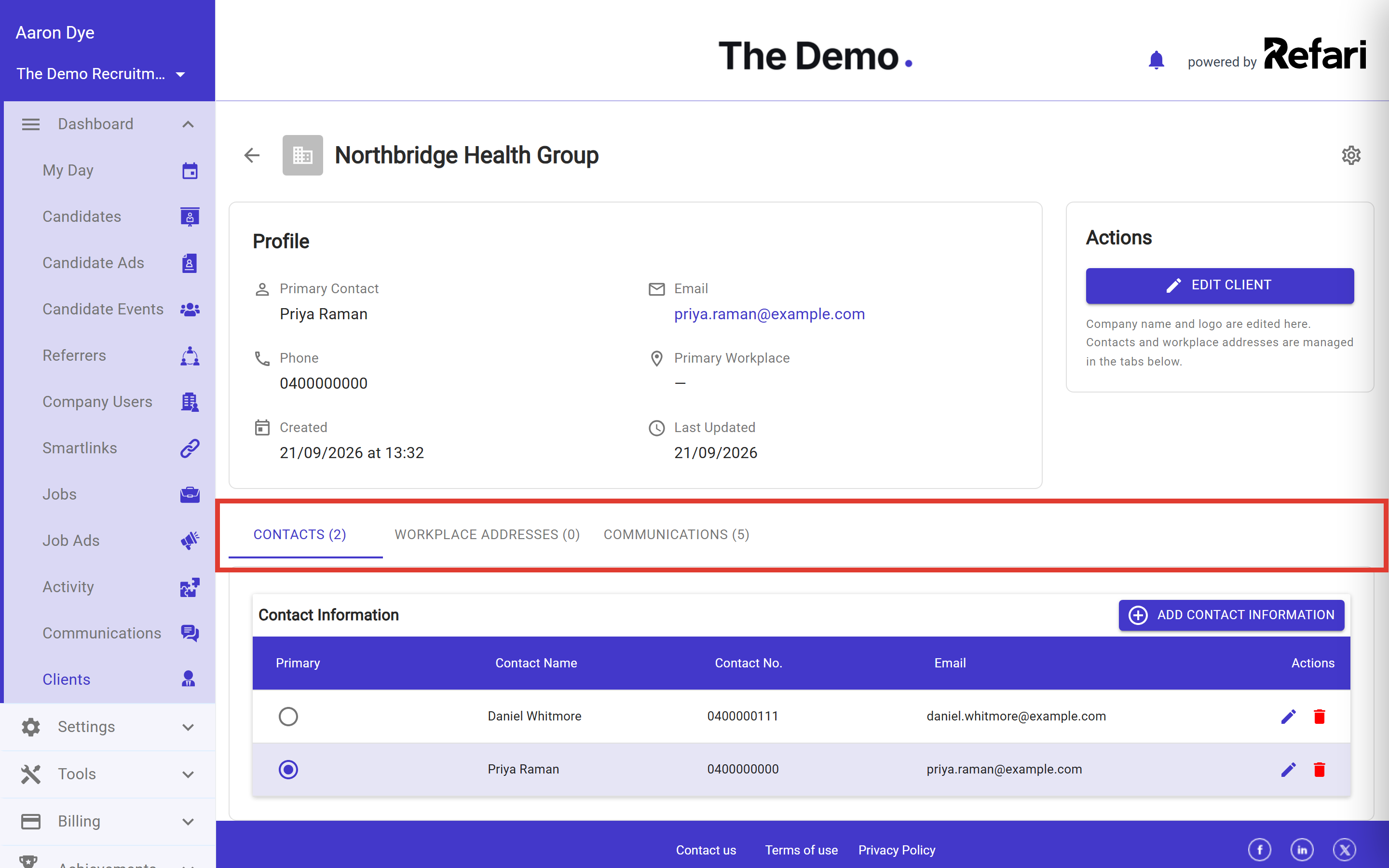
Where your client records and contacts come from
There are two ways a client and its contacts get into Refari.
Imported automatically from your ATS
This is how most of them arrive. Whenever Refari imports a job advert, a job order or a placement from your applicant tracking system (ATS), the platform your team uses to manage jobs and candidates, it also brings across the company that role belongs to and the contact attached to it. Nobody on your team has to do anything, and there is no separate "import clients" step. It simply happens as a side effect of your jobs syncing.
This works the same way whichever system you are connected to, whether that is JobAdder, Seven20, Recruit Wizard, or an ATS connected through the Refari Integrator such as Loxo. The examples below use JobAdder because it is the most common, but the behaviour is identical on every integration.
This is why you may find clients and contacts in Refari that you do not remember adding, sometimes going back years. They came across with a job at the time.
Added by your team in Refari
You can also create a client directly in Refari, and add contacts to an existing client using the Add Contact Information button on the Contacts tab. Contacts added this way exist only in Refari and are not linked to anything in your ATS.
Why a contact you deleted in your ATS still appears in Refari
This is the most common surprise, and it is expected behaviour rather than a fault.
The sync is one way, and only for creating records. Your ATS tells Refari about companies and contacts as jobs come across, but it never tells Refari when one has been removed. So deleting or deactivating a contact in your ATS has no effect on the copy held in Refari. That record stays exactly where it is until somebody removes it in Refari as well.
Note: Removing someone in your ATS does not remove them from Refari, and removing them in Refari does not remove them from your ATS. If you want a contact gone from both, delete them in both places.How to remove a client contact
- Go to Clients in the dashboard sidebar.
- Find and open the client the person belongs to.
- Stay on the Contacts tab, which is the first tab under the client's profile.
- Find the person in the Contact Information table, then select the red bin icon at the end of their row.

Warning: Removing a contact is permanent. There is no undo and no archive to restore from, so check you have the right person before you confirm.If the contact originally came from your ATS and is still active there, removing them in Refari may not be the end of it. The next time a job referencing that person is imported, they will be recreated, because the import treats them as a contact it has not seen before. To stop that happening, remove or deactivate them in your ATS as well. Once they are inactive there, the import skips them and they will not come back.
What removing a contact does to your jobs
Nothing is deleted except the contact themselves. If that person was listed as the hiring manager on a job or job order, that field is simply cleared. The job, the job advert, its applications and its history all stay exactly as they were, and the client record remains with its other contacts.
Contacts are also held separately for each Refari account. Removing a contact from your account has no effect on any other Refari customer who happens to deal with the same person.
Does Refari email your client contacts?
Refari does not send newsletters or marketing email, and it never passes your client contacts to any other tool. There is only one feature that emails a client contact directly.
If your team uses TopRec, Refari can email the contact after a placement to ask how the recruiter performed, and collect a rating or testimonial. This is switched off unless your account has TopRec enabled, and you control it in your TopRec settings. For the full list of what goes out and when, see What TopRec communications are sent and when? ↗
One thing worth knowing is that Talent Alerts are separate. If someone signs themselves up for Talent Alerts on your careers site, that creates its own subscription record, completely independent of your client contact list. Deleting the client contact does not cancel that subscription, and cancelling the subscription does not remove the contact. A subscriber unsubscribes using the link at the bottom of any alert they receive.
Final Notes
If you are tidying up your client list, the quickest habit to adopt is to remove a contact in your ATS first and in Refari second, so the record cannot be recreated by the next sync. If you have removed someone from both and they still appear, get in touch with our support team and we will trace where the record is coming from.
Other articles you might be interested in: Why Can't I Delete Users from Refari that were synced from my ATS? | Which emails does the Talent Board send, and why?
Was this article helpful?
That’s Great!
Thank you for your feedback
Sorry! We couldn't be helpful
Thank you for your feedback
Feedback sent
We appreciate your effort and will try to fix the article