A short video can do what a page of copy cannot: let a candidate hear from the hiring manager, or let a client meet the recruiter behind a profile. This guide covers how to add a video to a job advert or candidate advert, which links turn into a player, and what happens when a link cannot.
Adding a video to an advert
You do not upload the video to Refari. It stays on YouTube, Vimeo or Loom, and you paste its link into the advert description, where Refari turns it into a player: a box that plays the video right there in the advert.
- Open the advert for editing. For a candidate advert, open it and click Edit Candidate Advert; for a job advert, open it and edit it in the same way.
- In the description, click where you want the video to go and start a new line.
- Copy the video's link from YouTube, Vimeo or Loom. The Share button on each service gives you the right link, and so does your browser's address bar while the video is open.
- Paste it into the description (Ctrl+V, or Cmd+V on a Mac). Refari checks the link with the video service, and after a moment the link is replaced by the player. If the check takes more than a moment, Loading the video player… appears under the editor while you wait.
- Save the advert.

You can add more than one video to an advert. Paste each link on its own line.
Note: The check happens when you paste a link. A link typed out by hand stays as text, so if that happens, delete it and paste it in instead.Idea: Changed your mind about a player? Press Ctrl+Z (Cmd+Z on a Mac) straight after it appears and it turns back into the link you pasted.Which links work
Refari asks YouTube, Vimeo or Loom directly whether a link is a video it can play, rather than trying to recognise the link's shape itself. That means the links people actually copy work, including several that used to stay as plain text.
| Service | Links that become a player |
|---|---|
| YouTube | Ordinary video links, from the address bar or the Share button. YouTube Shorts. Links with a start time on the end. A video you opened from inside a playlist. Live streams, including ones that have finished. |
| Vimeo | Public video links, and unlisted videos: the ones that are hidden from Vimeo search and can only be watched by people who have the link. |
| Loom | Share links, including ones with extra tracking text on the end. |
| Embed code | If a service gave you embed code rather than a link, copy the web address from inside it (the part in quotes after src=) and paste that. It works for all three services. |
A link with a start time becomes a player for the whole video, so it plays from the beginning.
Links that stay as links
- A whole YouTube playlist, or a channel page. Link to one video from it instead.
- A video that is private or has been deleted.
- Videos hosted anywhere other than YouTube, Vimeo or Loom, such as Dropbox or Google Drive.
When a link cannot become a player
If a link cannot be turned into a player, it stays in your advert as a clickable link, exactly where you pasted it. Refari never removes the text you pasted. A message appears under the editor to tell you why.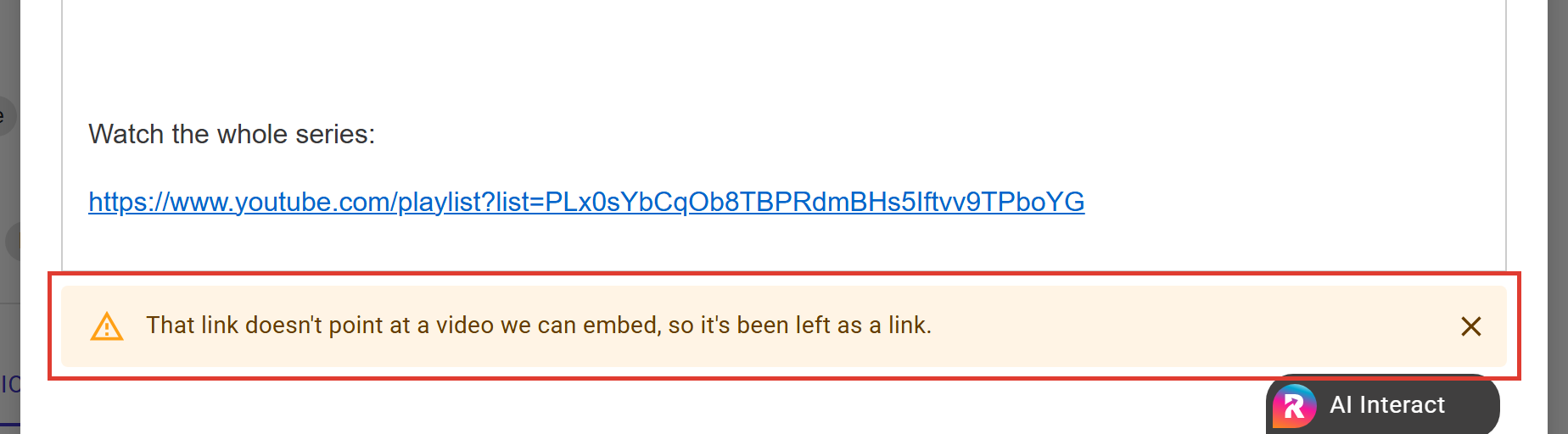
| The message says | What to do |
|---|---|
| That link doesn't point at a video we can embed, so it's been left as a link. | The link is to a playlist, a channel, or a video that is private or deleted. Open it and check it plays for someone who is not signed in, then copy the link to the single video. |
| Only YouTube, Vimeo and Loom links can be turned into a player. The link has been left as it is. | The video is hosted somewhere else. Upload it to one of the three services if you want a player, or leave it as a link. |
| The video service didn't respond, so the link has been left as a link. Try pasting it again in a moment. | The link may be perfectly good. Delete it and paste it again shortly. |
| Couldn't reach Refari to load the player, so the link has been left as a link. Check your connection and try again. | Your internet connection dropped. Once it is back, delete the link and paste it again. Nothing else in your advert is affected. |
| That link couldn't be turned into a player, so it's been left as a link. | Something else went wrong. Try pasting it again, and if it keeps happening, contact us with the link. |
The message stays until you paste another video link or close it with the cross, so you will not miss it if you looked away.
Choosing where to host your video
- Loom is the quickest way to record a personal introduction, such as a recruiter talking a client through a candidate, and share it straight away.
- Vimeo suits polished brand or culture videos. Making the video unlisted keeps it out of search while it still plays in your advert.
- YouTube is where most existing company videos already live. Bear in mind that its player can suggest other videos at the end, which can take a viewer away from your advert.
Whichever you use, only add videos you own or have permission to use.
Final Notes
After saving, open the advert on your job board or talent board and play the video once, to check it looks the way you expect. If a link you are sure is a working video will not become a player, contact us with the link and we will take a look.
Other articles you might be interested in: How to edit your Job Advert in Refari | How to Create a Candidate Advert with Refari
Was this article helpful?
That’s Great!
Thank you for your feedback
Sorry! We couldn't be helpful
Thank you for your feedback
Feedback sent
We appreciate your effort and will try to fix the article