This article explains, in plain English, how Refari makes the jobs on your website easy for candidates to find through search engines like Google. If your careers site uses a Refari job board, there is a piece of Refari technology working quietly in the background to boost your search visibility, get your roles into Google for Jobs, and keep everything up to date automatically. Here is what it does and why it matters.
The challenge: a brilliant job board that search engines struggled to read
Your Refari job board (the careers board on your website, open to anyone) is built as a modern, interactive widget. That is what makes it fast, attractive and easy to filter for the people visiting your site. Behind the scenes, though, it is drawn on the page using JavaScript, and search engines have historically found JavaScript-heavy content difficult to read.
The practical risk is simple: if Google cannot properly read your listings, your jobs may not show up in search results at all. You could be advertising great roles that candidates searching Google never see. That is exactly the gap Refari closes for you.
What Refari does about it
On Refari-powered WordPress sites, Refari runs dedicated search-optimisation technology that bridges the gap between your interactive job board and the search engines. It works automatically, with nothing for you to manage day to day, and it does several things at once:
- Builds a proper, search-friendly page for every job, candidate advert and team member profile.
- Adds the behind-the-scenes information Google needs to feature your roles in Google for Jobs.
- Tells search engines the moment a role is added, changed or expires, so they re-check quickly.
- Keeps your sitemap and social-sharing previews accurate as your live roles change.
- Tidies up after itself, removing expired roles and pointing dead links back to your job board.
The result is a careers presence that is far more visible in search, working for you around the clock without any extra effort from your team.
A search-friendly page for every job, candidate and team member
Refari keeps your website in step with your live data and creates a dedicated, search-optimised page for each of your listings:
- Every job gets its own page, complete with a clear title, description and the key details a candidate (and a search engine) is looking for.
- Your Talent Board (where you market your standout candidates publicly) is included too, so your candidate adverts are discoverable in search, not just on your site.
- Your team members' profiles are published as their own pages, helping the people behind your roles get found by name.
Crucially, your visitors still get the slick, interactive Refari experience. The search-friendly version exists alongside it for the search engines, so you get the best of both: a great experience for people and full readability for crawlers.
Getting your roles into Google for Jobs
Google for Jobs is the dedicated jobs box that appears near the top of Google's search results when someone searches for work. Roles featured there stand out with a prominent, visual listing well above the ordinary blue links, and it costs nothing to appear.
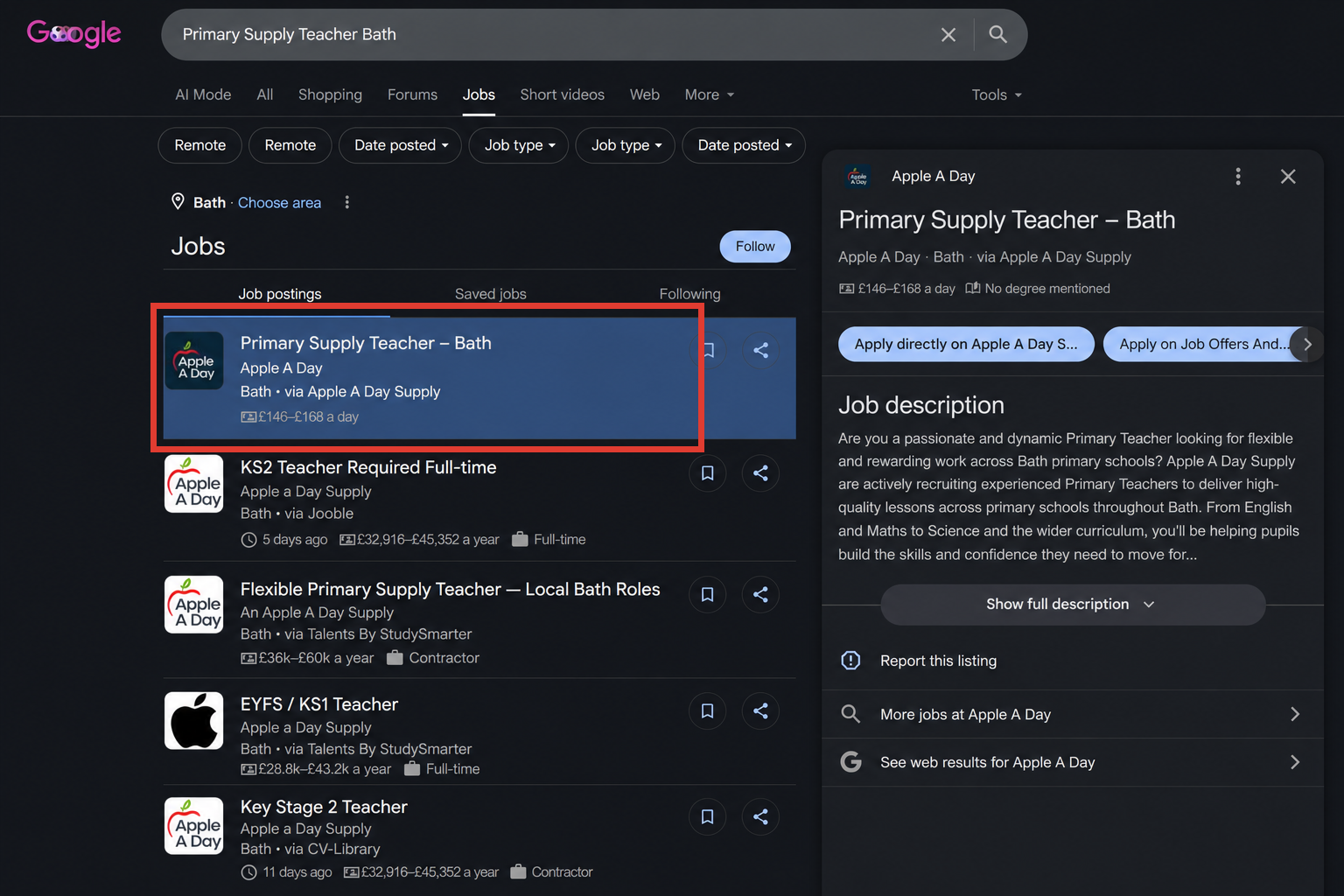
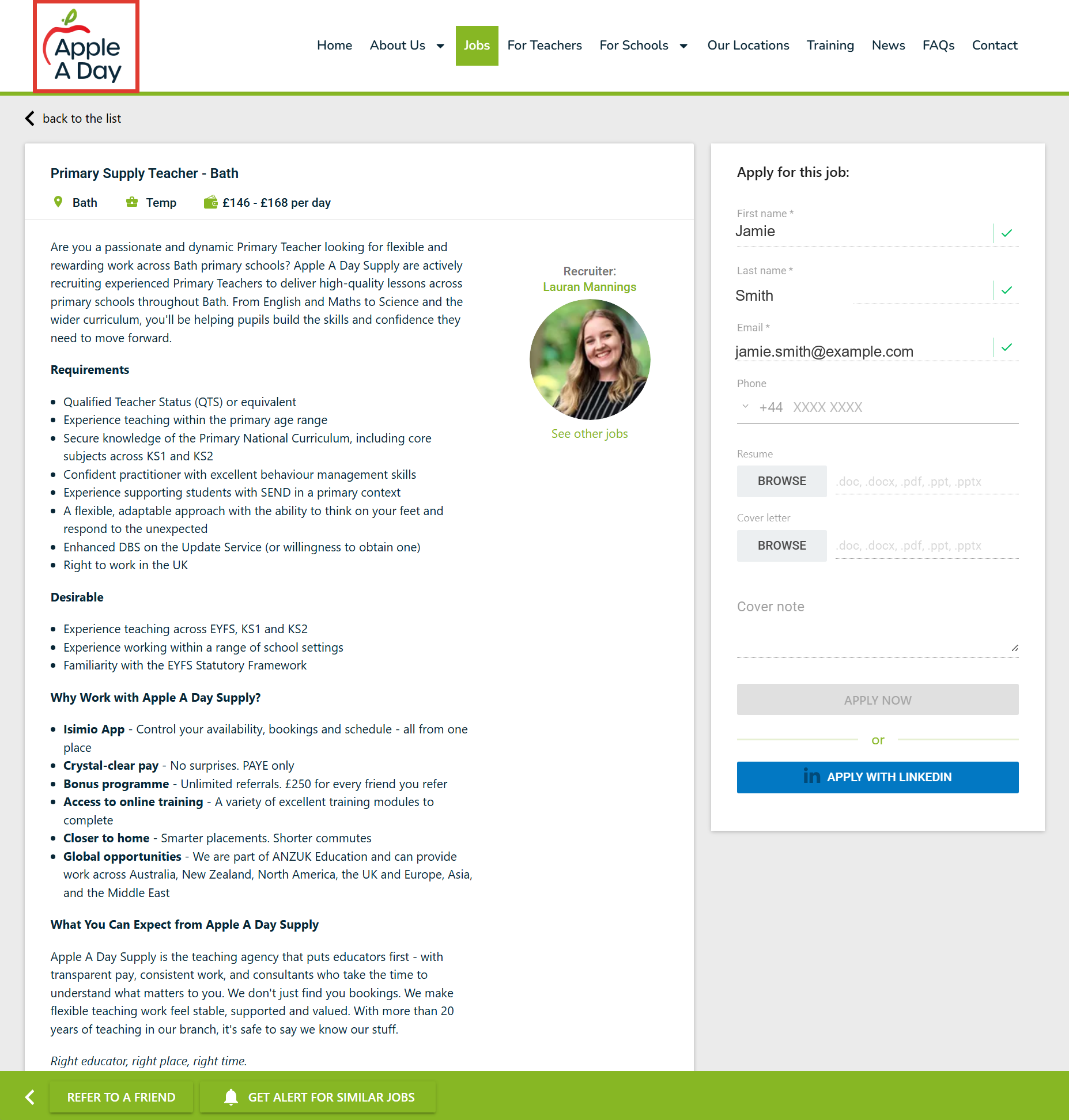
When a candidate clicks one of your listings, they land straight on your own branded job board, ready to apply, refer a friend or set up a job alert:
To feature a role there, Google needs your job details supplied in a specific, structured format it can understand: the job title, the standardised employment type (full-time, part-time, contract and so on), real salary ranges, the location, how to apply, and details about the hiring company. Refari attaches all of this to your job pages for you, so your roles are eligible to appear in Google for Jobs without anyone on your team having to format a thing.
Note: Refari makes your roles eligible for Google for Jobs and gives Google everything it needs, but the final decision on what to show, and when, always rests with Google. New websites and brand-new roles can take a little time to be picked up. The work to qualify is done for you; the timing is in Google's hands.Helping search engines find new roles fast
Search engines usually re-check websites on their own schedule, which can mean a delay of days before a new job is noticed. In recruitment, that delay costs you applicants while a role is at its freshest.
Refari shortens it. Whenever a role is posted, updated or expires, it actively notifies Google and Bing so they come back and re-check the relevant pages quickly. Your newest opportunities get discovered in hours rather than days, and roles that have closed drop out of search promptly so candidates are not applying for vacancies that no longer exist.
Sitemaps that stay accurate by themselves
A sitemap is the index search engines use to discover every page on your website. Refari keeps yours up to date automatically as roles come and go, so newly imported jobs appear in the sitemap without anyone needing to refresh anything by hand. It works neatly alongside popular SEO tools such as Rank Math and Yoast rather than fighting them, so your existing setup keeps working as expected.
Looking sharp when your jobs are shared
When you or a candidate shares a job link on LinkedIn, Facebook or in a message, Refari makes sure it shows a proper preview, with the right title, summary and image, instead of a bare, unappealing link. A polished preview earns more clicks, which means more eyes on your roles every time a link is shared.
Fast, tidy and self-maintaining
Speed matters to both candidates and search engines, so Refari serves these search-friendly pages in a lightweight, fast-loading form. It also keeps your site clean over time: expired roles are removed, and if someone lands on an old or broken job link, they are sent straight to your main job board rather than hitting a dead end. It is genuinely set-and-forget.
Idea: If you would like to watch your jobs being picked up and see how they perform in search, connecting your site to Google Search Console gives you a clear view. The related articles below walk you through it.What this means for you
Put simply, more of the right candidates find your roles, through free organic search, exactly where they are already looking. You appear in Google for Jobs, your newest vacancies get noticed quickly, your listings look professional wherever they are shared, and you lean less on paid advertising to be seen. Best of all, it happens automatically as part of your Refari job board, with no ongoing work for your team.
If you want to confirm your roles are being indexed and track how they perform over time, the next step is to connect Google Search Console to your website. Our guide on how to connect Google Search Console with Refari websites ↗ shows you how.
Final Notes
There is nothing you need to switch on or maintain. Refari sets this up and looks after it for you as part of your job board. If you ever feel a role is not showing up in search as you would expect, the best first checks are to make sure the role is live on your job board and to give search engines a little time to catch up. If you are still unsure, our support team is always happy to take a look.
Other articles you might be interested in: How To Connect Google Search Console With Refari Websites | Guide to Requesting Rapid Indexing in Google Search Console
Was this article helpful?
That’s Great!
Thank you for your feedback
Sorry! We couldn't be helpful
Thank you for your feedback
Feedback sent
We appreciate your effort and will try to fix the article