This article explains how candidate consent, privacy and marketing preferences are handled across the candidate journey in Refari. It covers three separate things: the privacy policy acknowledgement a candidate is shown when they apply, how to capture a marketing opt-in on your forms and make it available to your connected recruitment system, and how candidates opt in to and unsubscribe from your job alerts. A quick definition before we start: a job alert is an email that lets a candidate know when you post roles matching their interests, and a Company Admin is a user in your account with the highest level of settings access.
These three sit in different places and are managed differently, so it is worth being clear on which is which before changing anything.
| What it is | Where the candidate meets it | Where it is managed |
|---|---|---|
| Privacy policy acknowledgement | As they apply or register, via an Application Policy you add | Set up by a Company Admin in Refari |
| Marketing / communications opt-in | As a question on your application and registration forms | Captured on your forms, held on the Refari candidate record and exposed via webhooks / API; how it reaches your ATS depends on the depth of your integration |
| Job alert subscription | When they sign up for job alerts on your board | Opt-in and self-managed by the candidate in their own Refari profile |
1. Privacy policy acknowledgement at application
By default, Refari's application and registration forms do not include privacy or consent wording. To add your own, Refari has a feature called Application Policies that lets a Company Admin present your own policy acknowledgement as part of the application journey. Each policy is made up of a Policy Name and a Policy URL (linking to the relevant document, such as your Privacy Policy), and you add them under "Settings > Company Settings". Once added, your policy appears to the candidate as part of the journey as they apply, alongside a link to the document itself.
This is the simplest thing you can set up straight away, and it needs no technical work. The full steps, and a short video of how it looks to the candidate, are here: Adding Application Policies to ensure compliance from applicants ↗
2. Capturing a marketing opt-in and passing it to your ATS or CRM
Refari's standard forms capture the core candidate fields (name, email, phone, resume and so on). There is no separate marketing opt-in question on them by default, but you can add one yourself and have the answer flow through to your connected recruitment system (the ATS or CRM your candidates feed into, such as JobAdder). This is a setup you build once, using Refari's screener questions. A screener question is simply an extra question a candidate answers as they apply or register, so you can capture information the standard fields do not.
There are two steps to capture it on your forms. First, create the opt-in question. Add a screener question with a List field type and a simple set of options (for example, "Yes" and "No"), worded as your opt-in, such as "I am happy to receive information about future roles and relevant updates". You decide whether it is mandatory. Here is how to build it: How to create screener questions in Refari ↗
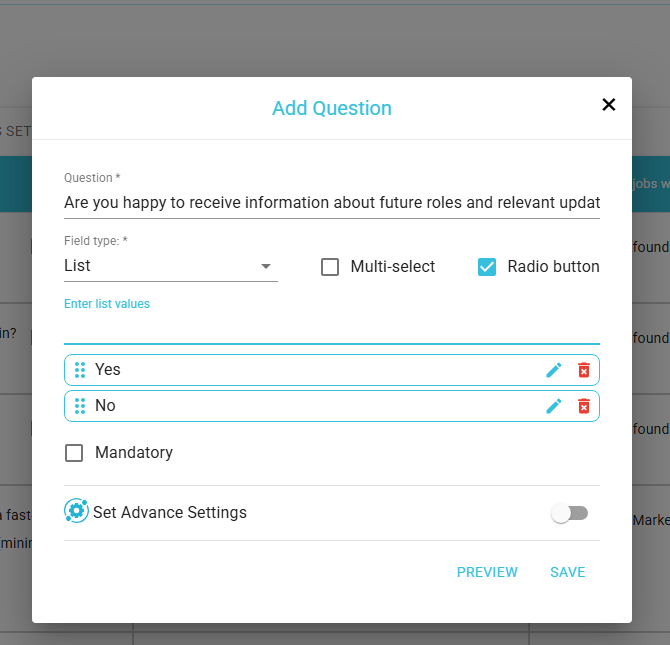
Second, add the question to your forms. A question only appears once it is part of a question set attached to your forms, so add your opt-in question to the set used on your application, and set it up on your registration widget as well, so it is captured whether a candidate applies to a role or registers their interest. This guide covers it: How to create Question sets for your screener questions ↗
Where the answer goes next
Once the opt-in is being captured, the answer is stored on the candidate's record in Refari and is also exposed through Refari's webhooks and API, so it is available to flow onwards. How it then reaches your recruitment system depends on how deep your integration with that system is, so it is worth knowing what your setup supports.
With a deep, two-way integration you can map the answer straight onto a field on the candidate record in your connected system, so the consent is stored against the candidate there. With other integrations the answer is still available on the Refari record and through our webhooks and API, but whether it is written into your system depends on the integration that has been built to Refari. If you are not sure what your integration supports, reply here and our team will confirm.
Note: This opt-in question is not switched on by default. It is something you choose to build, so if you are introducing consent capture for the first time it is worth planning the exact wording with whoever owns compliance for your team before you go live.3. Job alerts: opt-in and unsubscribe
Job alerts are the one area where Refari itself sends candidates ongoing communications, so consent and unsubscribe for them are handled inside Refari rather than in your ATS. The model is opt-in by design:
- Alerts are strictly opt-in. A candidate only receives job alerts if they have signed up for them. No alert is ever created or sent to someone who has not opted in.
- Candidates manage their own alerts. From their own Refari profile a candidate can change what they are alerted about, adjust how often they hear from you, or unsubscribe entirely, at any time.
This is deliberately kept in Refari because not everyone who signs up for your job alerts is pushed into your ATS as a candidate record. Someone can subscribe to your alerts without ever applying, so Refari owns the job alert subscription along with its consent and unsubscribe. In short, for job alerts specifically, the opt-in and the unsubscribe are the candidate's own, self-served through their Refari profile.
Please note: this article explains the mechanics available in Refari and is not legal advice. Your obligations under laws and guidance such as the Spam Act and ACMA are yours to determine, ideally with a qualified adviser. If it is helpful as a starting point, we have an example privacy policy template you can adapt.Final Notes
A good order to work through these is: add your Application Policy first (it is quick and needs no setup), then build your marketing opt-in question and decide how it should flow into your recruitment system when you are ready, and rest assured job alerts are already opt-in and self-managed. If you would like a hand setting any of this up, reply here and our team will walk you through it.
Other articles you might be interested in: Adding Application Policies to ensure compliance from applicants | How screener answers and marketing consent flow into JobAdder | Refari Forms: application, registration and referral forms explained
Was this article helpful?
That’s Great!
Thank you for your feedback
Sorry! We couldn't be helpful
Thank you for your feedback
Feedback sent
We appreciate your effort and will try to fix the article