This guide walks you through how candidate referrals work on Refari for internal recruitment teams, from the moment a referral reaches you through to rewarding a hire. It is the central place to understand the whole process, and it links out to the detailed how-to articles for each step. If you run a recruitment agency rather than an in-house team, a separate guide covers your setup: see Candidate referrals on Refari: a complete guide for recruitment agencies ↗.
An employee referral scheme turns the people who already know your organisation into a steady source of quality candidates. A referral is a recommendation: someone tells you about a person who could be right for one of your roles. The person making the recommendation is the referrer, who might be one of your employees, a former colleague or someone in your wider network. Refari makes each referral traceable, keeps the referrer informed as the candidate progresses, and shows the reward owed if the candidate is hired.
How a candidate referral reaches you
There are two ways a candidate referral comes in.
Through your careers site ("Refer a Friend")
Every job, and your careers board itself, carries a "Refer a Friend" option. The referrer can either refer the job to someone they think is a good fit, or recommend a person to your team directly. Either way Refari creates a branded, trackable link, so the referral is credited to the right referrer automatically.
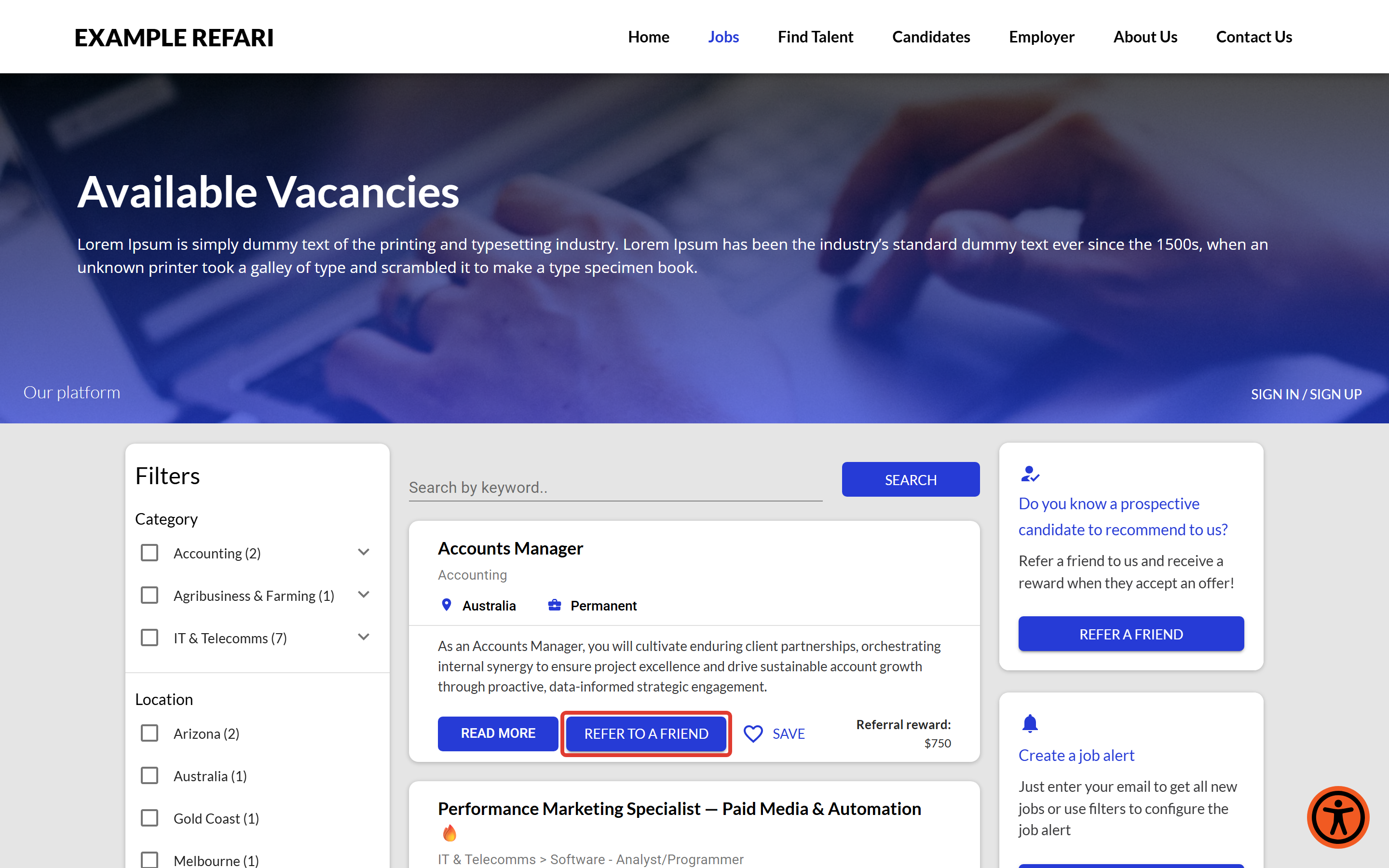
To see exactly what the referrer and the prospective candidate experience when a referral is made, including the emails they receive and the screens they land on, read What do prospective candidates see when they receive a job referral ↗.
Beyond the buttons on your board, there are two other ways to put referrals in front of your people. The first is a direct link that opens the refer-a-friend popup on its own, which is handy for an internal email campaign or an all-staff announcement. The steps are in How to create a direct link to the refer a friend popup ↗.
The second is a standalone Referral widget you can embed anywhere on your site, such as an internal careers page or your intranet, so people can refer without browsing your jobs first. To set one up, see Referral Widget - How to install it and the customisation available ↗.
Logged by you (a "direct referral")
When a referral reaches you another way, by phone, email or in person, you log it so the referrer still gets the tracking and transparency that a board referral would. You can log a direct referral inside Refari, and if your ATS supports it, from within your ATS as well. There is more on working with your ATS further down.
Setting up your referral scheme
Your scheme is configured once, under "Settings > Company Settings", and there is a step-by-step walkthrough in Setting up your referral scheme in Refari ↗. The key things to set are:
- Your reward fees. Decide what a successful referral is worth to you. You can set a default reward, an optional percentage of the value you record against the role, optional amounts that vary by work type (for example permanent versus contract), and a maximum cap so a single reward never goes above a figure you are comfortable with. How these pieces combine into the reward for a particular job is covered in the next section. For a fuller explanation of how the dynamic reward model works, see What are dynamic referral rewards and how do they work ↗. When you need to adjust the amounts later, the steps are set out in How to edit Referral Rewards ↗.
- Your candidate ownership period. This sets how long a referrer "owns" a candidate they referred, which is the window in which a later hire still earns that referrer their reward. You can choose 3, 6, 12, 18 or 24 months to match how long your roles typically take to fill. To see exactly how the period is applied, and what happens once it lapses, read What is candidate ownership period for referrals and how does it work ↗.
- Your referral scheme terms and conditions. Add the URL of your scheme's terms so referrers can read the rules straight from your board before they take part. The steps for adding that link are in How to add Referral scheme terms and conditions to your Refari Job board ↗. If you do not have a set of terms drafted yet, you can start from our example terms and conditions ↗ and adapt them to your organisation.
- Your display options. Control how the "Refer a Friend" block appears on your board, and whether the reward amount is shown publicly to the people viewing your jobs.
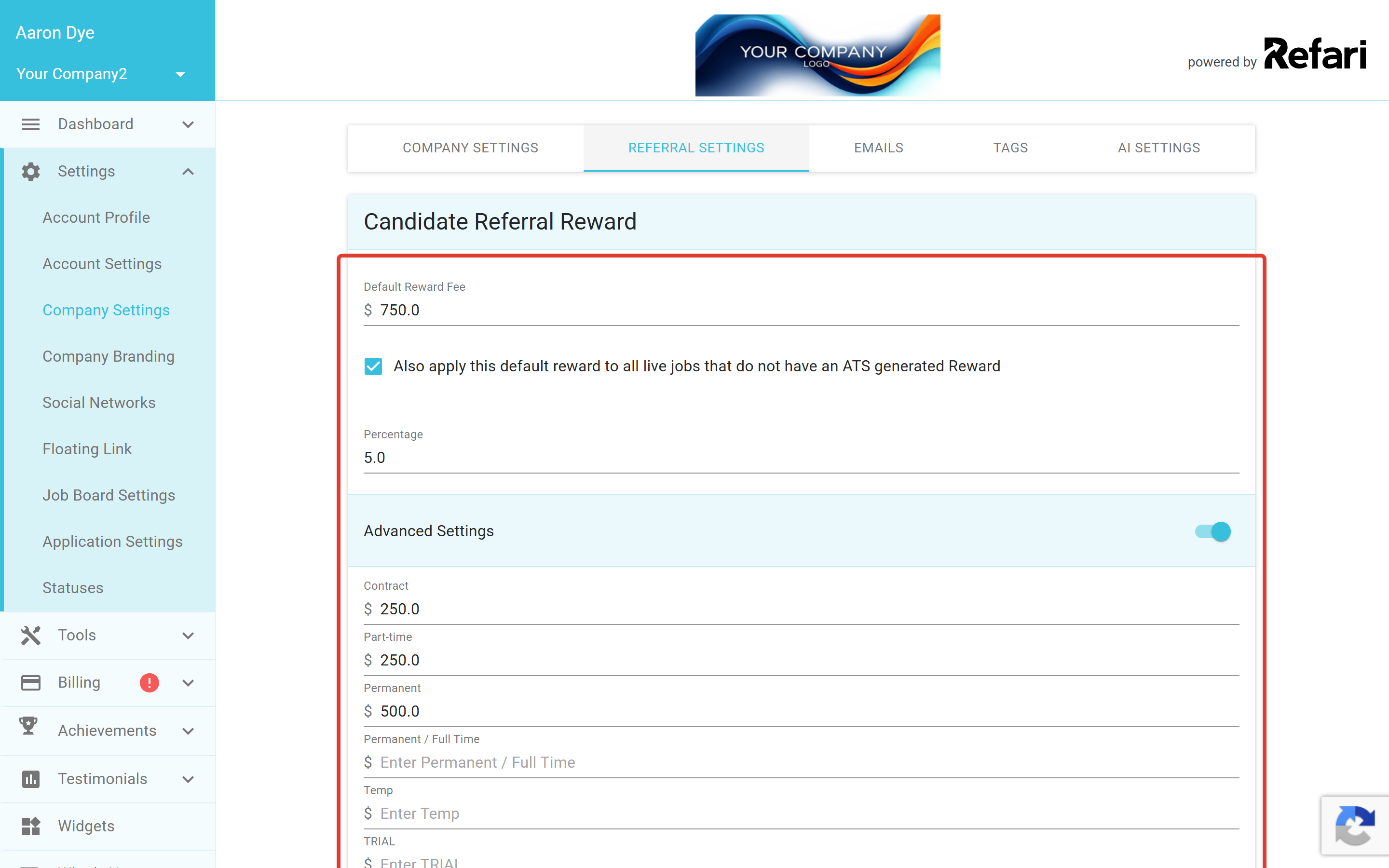
Note: Only Admins can change these settings. Managers can view them but not save changes, and team members with the base role do not see the settings area.How referral rewards are calculated
Refari works out the reward for a job in a strict order, taking the first one that applies:
- Manual. A reward you set by hand on a specific job. This wins over everything else for that job, and it sticks even when the job re-syncs from your ATS.
- Percentage. A percentage of the value recorded against the job (imported from your ATS), capped at your maximum reward.
- Work type. A set amount for the job's work type, if you use work-type rewards.
- Default. Your standard referral reward, used when none of the above apply.
Most internal teams set a flat default reward, and optionally a higher amount for harder-to-fill work types. See How to change a Job's Reward Fee ↗ to override a single job.
On timing, the simple answer is to pay as soon as the candidate is hired, and to build a small buffer into the reward to cover the occasional candidate who does not pass probation, rather than making referrers wait. See When should I pay a referral reward ↗.
Note: Refari logs and tracks the referral process and shows you the reward owed, but it does not handle the payment itself. You pay the referrer through your own process, whether that is payroll or another route. The amount Refari shows is based on your current reward settings, so treat it as a guide.Your internal job board, and how it connects to your public board
This is where an internal recruitment setup differs most from an agency one, so it is worth being clear about the two job boards involved.
Your public job board is the careers board on your website, powered by Refari. It is open to anyone: candidates, employees and the wider public can browse your roles, apply and refer people to them.
Your internal job board is a separate, private board for your own people. Refari can run it alongside your public board. It shows your regular public roles and, if you use them, internal-only roles that never appear anywhere public. It is an optional capability, so if you would like it switched on, talk to the Refari team.
The two boards can show different referral rewards, and they are connected on purpose so that internal referrals feed your public board. The rest of this section explains both.
Setting a separate internal reward
When the internal board is enabled, you can set referral reward values for it that are completely separate from your public-board values: a default internal reward, an optional percentage, optional per work-type amounts and a maximum cap. You set these under "Settings > Company Settings > Referral settings", in the Internal Referral Reward section, which appears alongside the public Candidate Referral Reward section once the internal board is on. This means the same role can show one reward to your employees and a different one, or none at all, on your public board.
How an internal referral reaches your public board
Here is the part that ties the two boards together. When an employee refers one of your regular roles from the internal board, Refari shows them the internal reward value, but the person who receives the referral link lands on your public job board to view the role and apply. So your internal board, with its own reward values, quietly drives referral traffic to your public board. That is how internal and external referrals connect when a job is referred to someone.
Note: Internal-only roles behave differently. They appear only on the internal board, never on your public one, and they can be referred by email alone, to the company email domains you have whitelisted. This keeps those roles and their candidates inside your organisation.Candidate ownership and duplicate referrals
The ownership period does two jobs. It sets how long the referrer keeps receiving updates about their candidate, and it governs when someone else can refer the same candidate to you.
Refari treats two people with the same email address as the same candidate. If a candidate you already know is referred, whether you reward that referral is down to your own scheme terms, and what happens to ownership depends on how the referral came in and whether the previous referrer's ownership period has expired. See What happens if you already 'know' a referred candidate ↗.
Keeping your referrers in the loop
As you move a referred candidate through your process, Refari emails the referrer to keep them informed, from the moment you log or receive the referral through to a hire. This transparency is what keeps referrers engaged and referring again, even when a particular referral does not work out. It matters even more for an employee scheme, where the referrer sees their colleagues every day and wants to know what happened to the person they recommended.
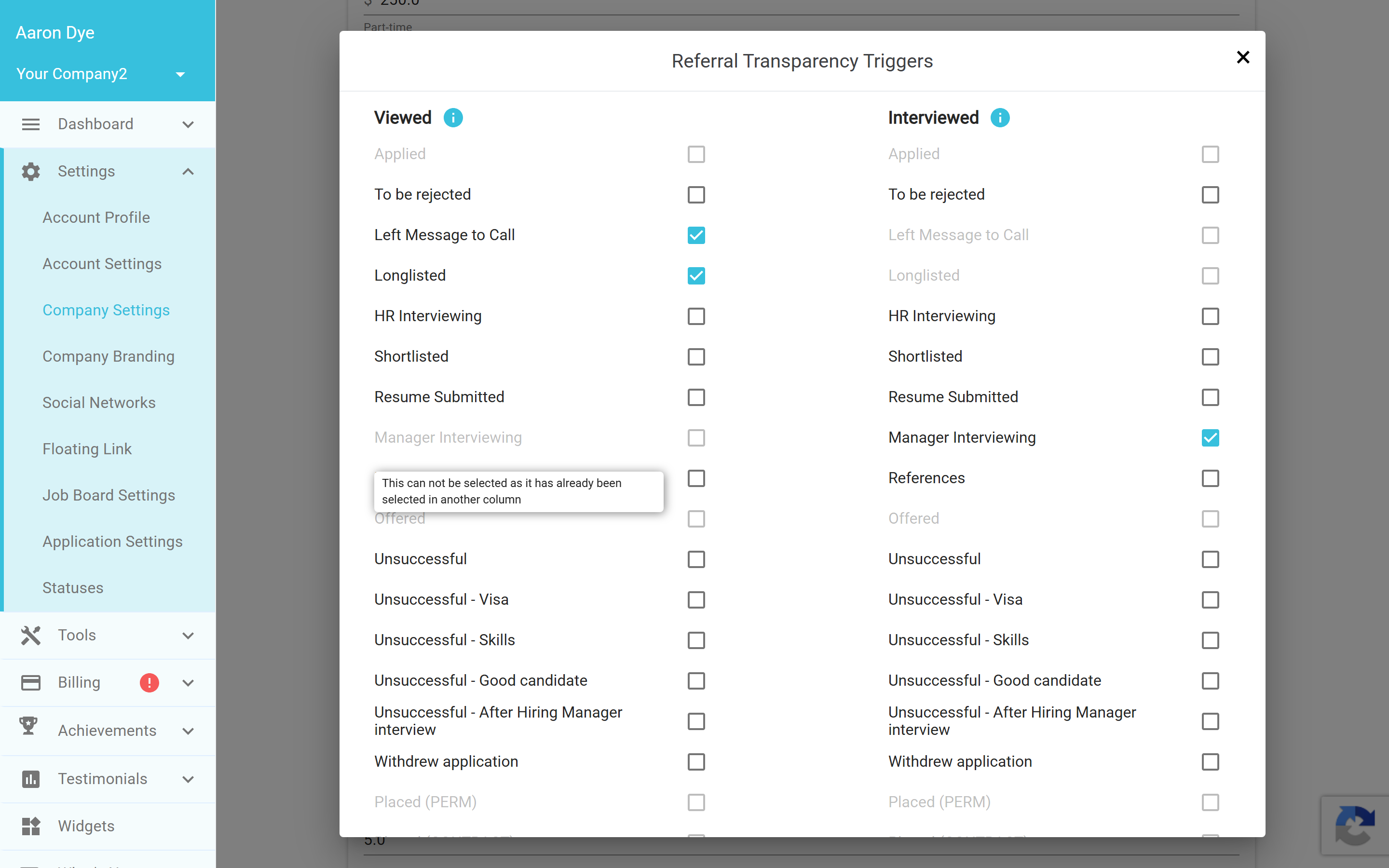
You control these updates with your transparency triggers: the pop-over where you map which of your statuses should let a referrer know their candidate has progressed (for example, viewed, interviewed, offered and hired). If you do not set any triggers, no transparency communications are sent. For the full detail on which updates are sent and how to set your triggers, see Referral transparency: the updates your referrers receive (and how to control them) ↗.
Working with your ATS
Refari integrates with your ATS, so your jobs, candidates, statuses and hires stay in sync without double handling. The transparency triggers you set map your ATS statuses to the updates your referrers receive, and if you run more than one Refari brand, each referral is routed to the right one.
You can also log a direct referral from inside your ATS, so it is tracked just like one made through your board. The exact steps depend on your ATS. If you use JobAdder, see How candidate referrals work with JobAdder ↗.
Seeing and managing referrals in Refari
Inside Refari you can see every referral as it arrives and review the people sending them to you. These sit in two places, Candidate Events and your Referrers list, described below.
- Candidate Events is where new referrals land. From here you can rate how relevant a referral is and push the candidate into your ATS. The relevance rating builds each referrer's track record over time.
- Referrers is your list of everyone who has referred to you, with their number of referrals and their average ratings, so you can see who your most active referrers are.
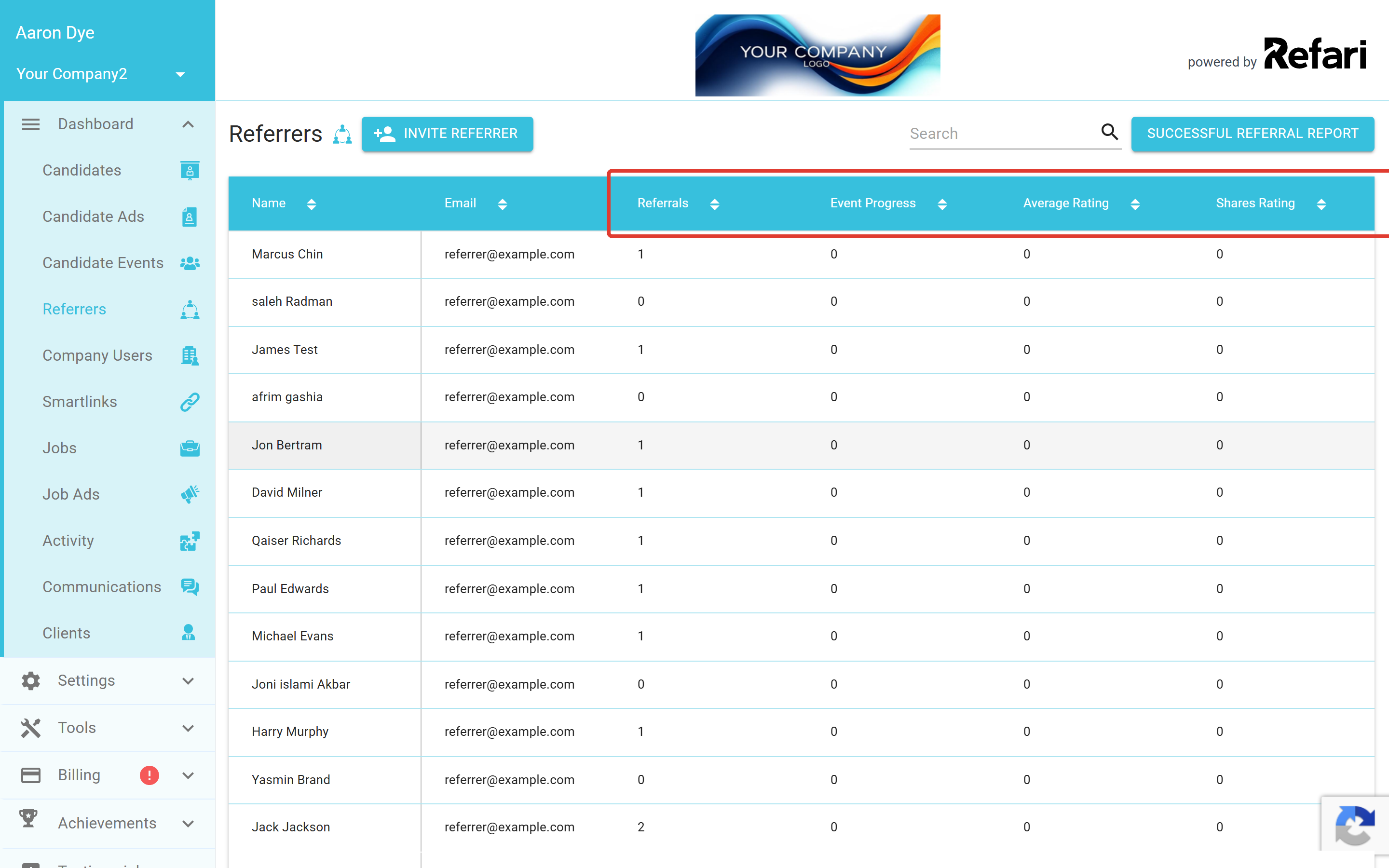
When it is time to reward people, the Successful Referral Report on the Referrers page is the quickest way to see your successful referrals in one place. Choose a date range and Refari produces a spreadsheet of every referral that reached a hire, showing who made it, the candidate, the relevant dates, an estimated reward for each, and an Internal or External label so you can tell at a glance which scheme applied. The reward figure is an estimate based on your current reward settings, so treat it as a guide rather than a final amount. For a closer look at this report and both dashboard views, see Managing referrals in Refari: Candidate Events and your Referrers list ↗.
Getting more referrals
Two things keep a referral scheme healthy. The first is talking about it, so people know they can refer. The second is making it a habit across your team, which is exactly what Refari's Achievement Badges encourage through the Referrals - Direct and Referrals - Web categories. To see how badges work and how they nudge people to keep referring, read Achievement Badges: what are they for and how do they help ↗. For broader tips on getting the most from the platform, our Best practices with Refari ↗ guide is a good next read.
Idea: Promote your referral scheme where your people already are: the intranet, all-hands meetings, onboarding for new starters and team email signatures. The more often employees are reminded they can refer, the more referrals you receive.Final Notes
Candidate referrals work best when the basics are in place: a clear reward, an ownership period that matches your scheme terms, and transparency triggers set so referrers always know where their candidate is. With those configured, the rest runs in the background as you work your candidates as normal. If you would like a hand setting any of this up, the Refari team is happy to help.
Other articles you might be interested in: Setting up your referral scheme in Refari | What is candidate ownership period for referrals and how does it work | Referral transparency: the updates your referrers receive (and how to control them)
Was this article helpful?
That’s Great!
Thank you for your feedback
Sorry! We couldn't be helpful
Thank you for your feedback
Feedback sent
We appreciate your effort and will try to fix the article