Job adverts you post in JobAdder sync automatically to your Refari job board. Occasionally one won’t appear, and it is almost always one of a few things. This article lists the main reasons, explains each one, and shows you how to fix it.
The main reasons an advert might not appear
- The Currency is not a standard currency that Refari recognises.
- Salary Min or Salary Max contains text instead of a number, or the Salary Minimum is higher than the Salary Maximum.
- The Rate Type is not a standard pay period.
- The advert’s Job Owner is a recruiter who has been deleted in JobAdder.
Each of these is explained below. If none of them apply, the cause may be a temporary sync issue between JobAdder and Refari, which is covered at the end.
1. Currency
This is the most common cause. Refari only recognises standard world currencies. When posting in JobAdder, set the Currency field to either a built-in currency from JobAdder’s standard list, or a valid 3-letter currency code.
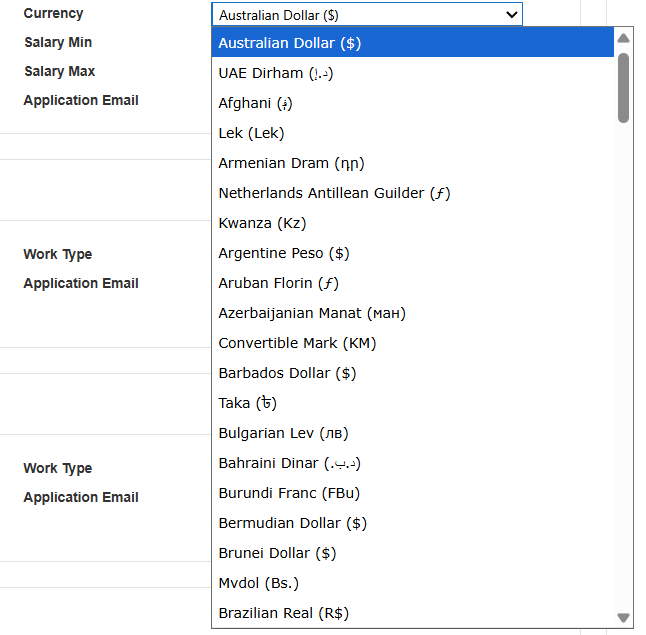
- A built-in currency from JobAdder’s list, for example Australian Dollar ($), Philippine Peso or New Zealand Dollar ($); or
- the 3-letter currency code if you enter it manually, for example AUD, PHP, NZD or USD.
Note: Do not create a custom currency with a free-text name (for example “PILIPINO PESO”). Refari can’t match a custom label to a real currency, so the advert is rejected and won’t appear on your board.You manage the currencies available in your portal (and can remove a custom one like the example above) in JobAdder under Account Admin > Job Ads > Job Portals: click Values for the relevant portal, then open the Currency tab. The same screen has tabs for Rate Type and the other portal values.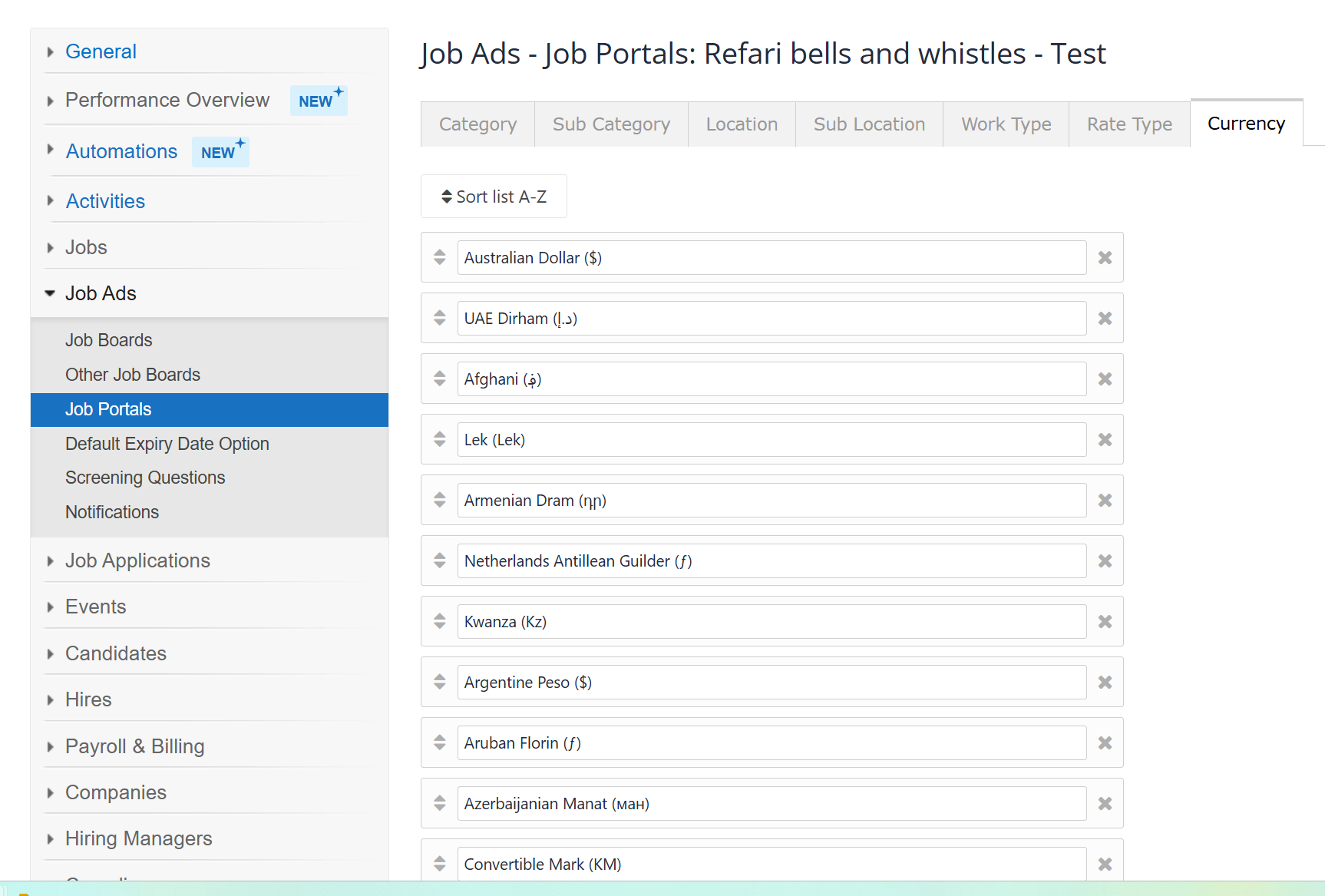
2. Salary Min and Salary Max
These fields must contain numbers only, for example 80000. Text such as “TBC”, “Negotiable” or “Competitive” will stop the advert from publishing. If you’d rather not specify a salary, leave the field blank instead of typing words.
They also need to be entered the right way round: the Salary Minimum must be lower than the Salary Maximum. If the minimum is higher than the maximum (for example a minimum of 100000 with a maximum of 80000, where the two figures have been swapped), Refari rejects the advert and it will not appear on your board. Check that the smaller figure sits in Salary Min and the larger one in Salary Max.
Note: A back-to-front salary range is easy to miss. If a role has a salary set but still is not appearing, check that Salary Min is the lower number and Salary Max is the higher one.3. Rate Type
Use one of JobAdder’s standard rate types: Hourly Rate, Daily Rate, Weekly Rate, Monthly Rate or Annual Salary. Refari reads the pay period from the rate type name and uses it to display the salary on your job board. If you rename these or add your own, the name must clearly contain the period (hour, day, week, month, or annual/year); a value Refari can’t read as a period will stop the advert publishing (for example “Per Annum”, “Fortnightly” or a number would not be recognised).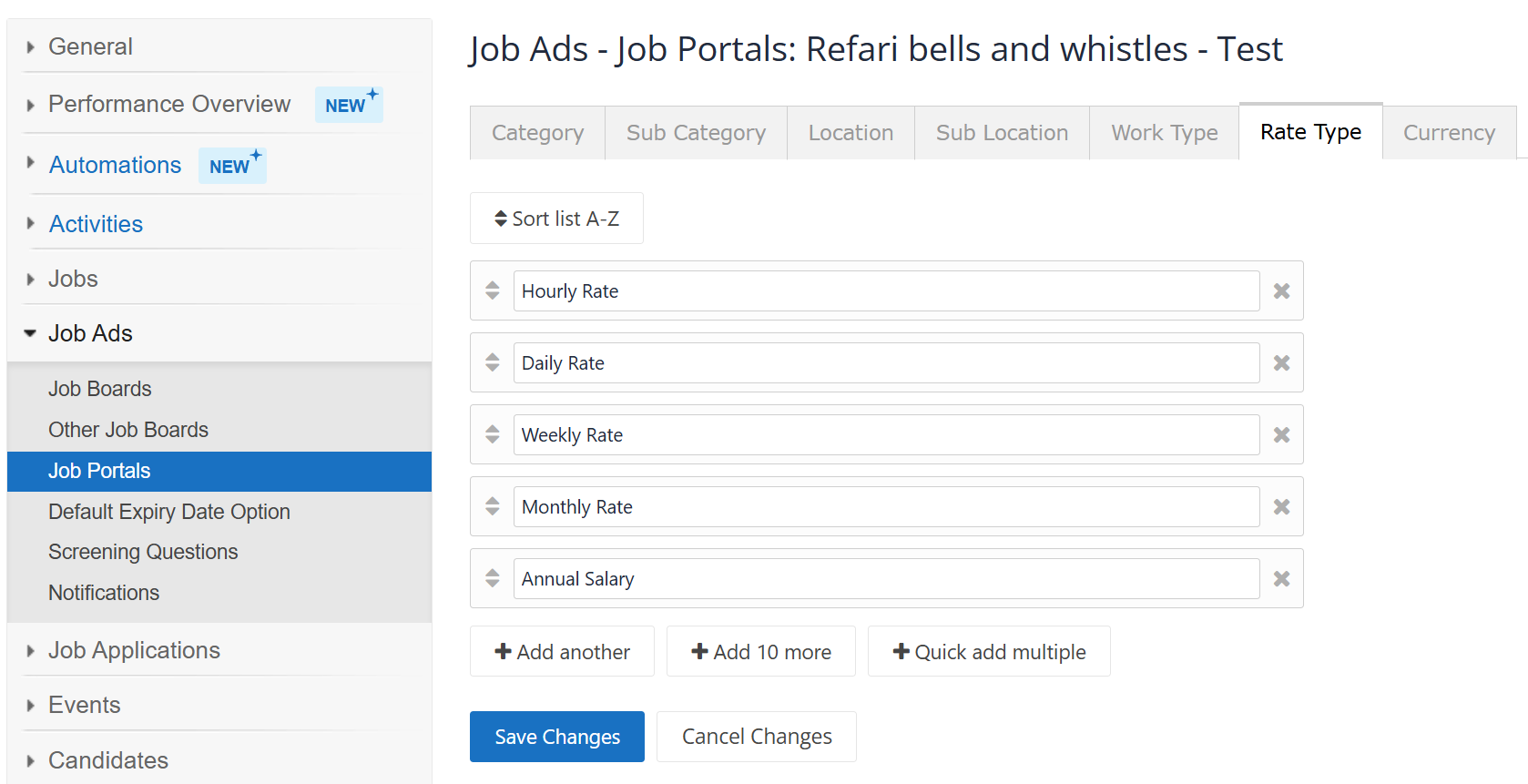
4. Recruiter (Job Owner)
Each advert is attributed to a recruiter using its Job Owner in JobAdder (the same Job Owner used to allocate adverts to recruiter profiles). JobAdder users and Refari recruiters stay in sync, so a current Job Owner will normally already exist in Refari. The problem arises when an advert’s Job Owner is a recruiter who has since been deleted in JobAdder: the advert is still attributed to that deleted person, who no longer exists in Refari, so it can’t import. Reassign the advert to a current Job Owner in JobAdder, then re-save.
How to fix an advert that hasn’t appeared
- In JobAdder, open the job advert and check the items above (most often it’s the Currency).
- Correct the value: choose a valid currency, use numbers in Salary Min or Max with the minimum lower than the maximum, pick a standard Rate Type, or reassign the Job Owner to a current recruiter.
- Save the advert. It will re-sync to your Refari job board automatically, usually within an hour.
If the advert still doesn’t appear
If you’ve corrected the items above and the advert still doesn’t appear, it may be a temporary connection or sync issue between JobAdder and Refari rather than the advert itself. Refari re-checks JobAdder on a regular schedule, so allow time for the next sync. If it still doesn’t appear, raise a ticket through our Support Centre and include the advert title or reference. For sync timing, see How Often Does Refari Synchronise Information with JobAdder?
Keeping your job board tidy
Categories, Locations and Work Types are flexible: whatever you set in JobAdder is created automatically on your Refari job board, so they won’t stop an advert appearing. Because of this, keep your naming consistent and free of typos, as every different spelling becomes its own filter on your live job board (for example, “Accounting” and “Acct” would show as two separate categories).
Final Notes
To avoid publishing issues, stick to JobAdder’s built-in values rather than creating custom ones, use numbers (not words) in salary fields with the minimum below the maximum, and make sure each advert is owned by a current recruiter.
Other articles you might be interested in: How Often Does Refari Synchronise Information with JobAdder? | How to add or remove Categories, Locations, Work Types to your Refari Job Portal for JobAdder users
Was this article helpful?
That’s Great!
Thank you for your feedback
Sorry! We couldn't be helpful
Thank you for your feedback
Feedback sent
We appreciate your effort and will try to fix the article