If a Loxo job isn't showing on your Refari job board, it is almost always because the job is not published with a status of Active in Loxo, or because it is missing one of four details Refari needs: an owner, a category, a job type or a location. Fix the job in Loxo, save it, and it normally reaches your board within a few minutes.
This article explains each reason a Loxo job might not appear, how to check it, and what to do if the job still doesn't show. Your Refari job board is the careers board on your website, open to anyone, and it is filled automatically from the jobs in your Loxo account (Loxo is the applicant tracking system, or ATS, where your team manages jobs and candidates).
The main reasons a Loxo job isn't showing on your website
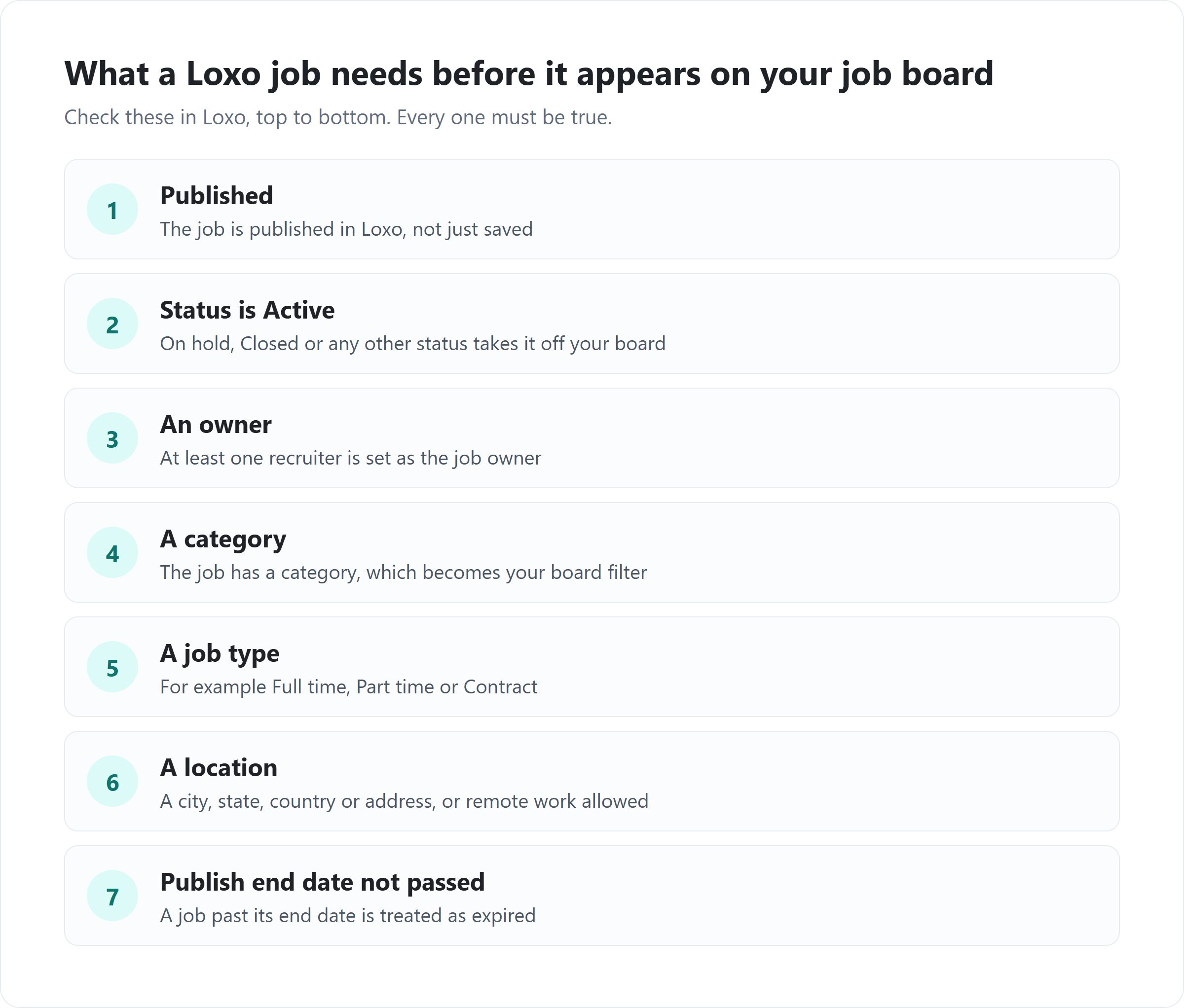
- The job is not published in Loxo.
- The job's status is not Active.
- The job has no owner (recruiter).
- The job has no category.
- The job has no job type.
- The job has no location.
- The job's publish end date has passed.
Each of these is explained below. If none of them apply, the cause may be the connection between Loxo and Refari, which is covered at the end.
1. The job is not published in Loxo
Refari only brings across jobs that are published in Loxo. A job that has been created and saved but not published stays private to your team, so Refari leaves it off your job board. This is by design: it lets you prepare a role in Loxo before it goes public.
Open the job in Loxo and make sure it is published. As soon as it is, Loxo tells Refari about the change and the job is imported.
Note: The reverse also applies. If you unpublish a job in Loxo, Refari removes it from your job board. If a job has disappeared from your board, check whether someone has unpublished it.2. The job's status is not Active
A published job must also have the status Active. If the status is anything else, such as on hold or closed, Refari treats the role as not currently open and does not show it. If the job was already on your board, changing its status away from Active removes it.
Set the job's status back to Active in Loxo if the role is open again.
3. The job has no owner
Every job on your Refari job board is attributed to a recruiter, so candidates can see who is handling the role and applications reach the right person. Refari takes this from the job's owner in Loxo. If a job has no owner at all, Refari cannot attribute it and the job is not imported.
Add an owner to the job in Loxo. If the job has more than one owner, Refari uses the first one listed. Make sure the owner is a current user in your Loxo account: Refari keeps its recruiter list in step with your Loxo users, checking for changes every three hours.
4. The job has no category
A category is the area of work a job belongs to, such as Accounting or Engineering. Refari requires one on every job, because categories become the filters candidates use to narrow down your job board and the topics they choose when they set up a job alert. A job with no category is not imported.
Choose a category for the job in Loxo and save it.
Idea: Keep your category names tidy in Loxo. Each different spelling becomes its own filter on your live job board, so "Accounting" and "Accountancy" would show as two separate categories.5. The job has no job type
The job type (sometimes called work type) describes the kind of engagement, for example full time, part time or contract. Refari requires it on every job, because it appears on the job advert and is a filter on your board. A job without a job type is not imported.
Set the job type in Loxo and save the job.
6. The job has no location
Refari needs to know where a job is based. It accepts any of the following from Loxo, in this order: the job's address, its city, its state or its country. If none of these are filled in but the job allows remote work, Refari lists the location as Remote. A job with no location details and no remote option is not imported.
Add the location to the job in Loxo. Filling in the structured address fields (city, state, postcode and country) rather than only a free-text address gives the best result, because Refari uses them to show the location clearly on your board and in the job feeds it sends to sites such as Indeed and Jora.
7. The job's publish end date has passed
If you set a publish end date on a job in Loxo, Refari uses it as the job's expiry date. Once that date has passed, the job is treated as expired and no longer shows on your job board, even if it is still published and Active in Loxo.
If the role is still open, move the publish end date in Loxo to a future date. If a job has no publish end date at all, Refari gives it 45 days on your board, and the 45 days start again each time the job is updated in Loxo, so a long-running role either needs an end date or an occasional save in Loxo.
How to fix a Loxo job that hasn't appeared
- In Loxo, open the job and work through the seven checks above.
- Correct anything that is missing: publish it, set the status to Active, and make sure it has an owner, a category, a job type and a location, with a publish end date in the future.
- Save the job. Loxo notifies Refari of the change straight away, and the job normally appears on your Refari job board within a few minutes.
You are done when the job appears on your job board with the right title, location and recruiter. If you have more than one job board, check the board you expect it on (see "Keeping your job boards and feeds in step" below).If the Loxo job still isn't showing
If the job passes every check and still hasn't appeared after a few minutes, try these in order:
- Save the job again. Refari hears about Loxo job changes as they happen. Making a small change and saving the job sends a fresh update, which picks up a job whose earlier update was missed.
- Check whether it is an older job. When your account was first connected, Refari imported the jobs published in Loxo within the previous year. A long-running role published before then comes across the first time it is saved in Loxo.
- Check the Loxo connection. Refari reads your jobs using the Loxo API key entered when your account was connected. If that key has been regenerated or removed in Loxo, no new jobs or changes will come through until the connection is renewed.
- Contact us. Raise a ticket through our Support Centre with the job title and its Loxo job ID, and we will check what Refari received for that job.
For everything Refari sets up when Loxo is connected, and how often each kind of information moves between the two, see How to connect Loxo to Refari: setup, what syncs and when ↗.
Keeping your job boards and feeds in step
These do not stop a job being imported, but they can make it look as though a job is missing.
You run more than one job board
If your account runs several boards, for example a main board and a specialist board for one sector, each board can include or exclude particular categories, locations or work types. A job can be on your main board but filtered off another. How each board decides which jobs to show is explained in Job Board Settings: choosing which jobs appear on each job board ↗.
The job is on your board, but not on Indeed or Jora
Refari also sends your live jobs to job aggregators (sites such as Indeed and Jora that collect jobs from many employers) through XML feeds, a machine-readable list of your roles. Each job can be included in or excluded from each feed, and aggregators collect the feeds on their own schedule. To check which feeds a job is in, see Manage Job Distribution to XML Feeds ↗.
Frequently asked questions
How long does a Loxo job take to show on my website?
Usually a few minutes. Loxo tells Refari each time a job is created, updated or deleted, and Refari imports the change straight away. If a job takes much longer than that, work through the checks in this article.
Why did a Loxo job disappear from my job board?
Refari removes a job from your board when it is unpublished in Loxo, when its status changes from Active, when it is deleted in Loxo, or when its publish end date passes. Reversing the change in Loxo brings the job back.
Do I need to change anything in Refari to fix a missing Loxo job?
No. Your Loxo jobs are managed in Loxo and Refari follows them, so make the fix on the job in Loxo and save it.
Why is the location on my job board different from the address in Loxo?
Refari shows the location from the job's address fields in Loxo. If only a free-text address is filled in, that text is used as it is. Fill in the city, state, postcode and country on the job to get a consistent location on your board and in your job feeds.
Final Notes
Most missing jobs come down to one field. Before you publish a role in Loxo, check it is Active and has an owner, a category, a job type and a location, and it will reach your job board on its own.
New to Refari? Refari adds a job board, job alerts, candidate referrals and reviews to your own website, filled automatically from Loxo, with every applicant sent back into Loxo. You can book a demo at refari.co.
Other articles you might be interested in: How to connect Loxo to Refari | How to add Loxo jobs to your website without an iframe | How Loxo job fields appear on your Refari job board
Was this article helpful?
That’s Great!
Thank you for your feedback
Sorry! We couldn't be helpful
Thank you for your feedback
Feedback sent
We appreciate your effort and will try to fix the article